# Wireless Channel
The **Wireless Channel** menu screen allows you to select which **wireless channel** the sensor’s built-in transmitter will use to communicate with your **Camtraptions Wireless Receiver**.

#### **Accessing the Wireless Channel Setting**
1. From the **Home Screen**, press the **Right Arrow** button until you reach the **Wireless Channel** screen.
2. Use the **Up** or **Down** buttons to change the wireless channel number.
3. Press the **Set** (centre) button to **save** your selection.
The selected channel must match the channel set on your **Camtraptions Wireless Receiver** for proper operation.
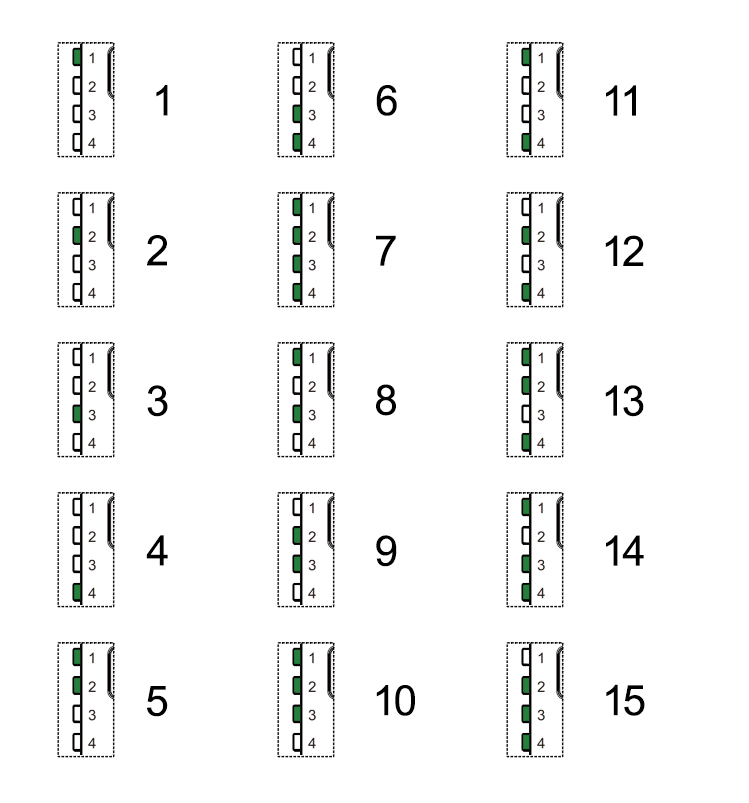
#### **Available Channels**
The sensor supports **15 wireless channels**, numbered 1–15. Each corresponds directly to the same numbered channel on the [Camtraptions Wireless Receiver](https://store.camtraptions.com/collections/flash-cables-accessories/products/wireless-trigger?variant=30110971212).
**
#### **Disabling Wireless Transmission**
To **disable the wireless transmitter** completely (for wired-only operation):
- Press and **hold** either the **Up** or **Down** button for more than **2** **seconds** while on the Wireless Channel screen.
The display will show **“OFF”**, indicating that wireless transmission is disabled.
In this mode, the sensor will **only trigger connected devices via the wired output socket**. It will also conserve some power and allow the sensor to operate for even longer in the field.